


Second Grade Learning Games
4.1875.00 Reviews
App Specs
- Version
- 10.0.1
- Updated On
- License
- Free
- Downloads
- 1,000,000+
- Developer
- RosiMosi LLC
- Categories
- Educational
- Platform
- Android
Screenshots

 Analysis by AppCompare
If you're on the hunt for an educational app that keeps your child engaged while learning, look no further than Second Grade Learning Games. I've been exploring this app, and it's got a lot to offer for both kids and parents. Let's dive right in and see what makes this app a great addition to your child's toolkit.
What matters most to me here is the format: this is a collection of short learning games rather than a single lesson path. That makes it easier to offer a child a focused activity when there is only a little time, while also giving them choices across school subjects. I would treat it as a practice companion, not as a replacement for a teacher, homework, or a book chosen for a child’s particular reading level.
A collection built around practice
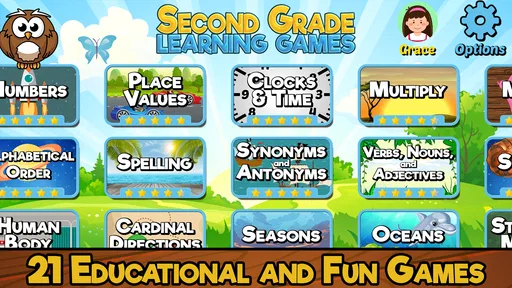
Second Grade Learning Games is an educational game from RosiMosi LLC. Its central appeal is the chance to move between activities for second-grade lessons instead of staying with one type of exercise. The game includes twenty-one activities, and the range gives a parent room to steer practice toward the subject that fits the moment. That flexibility is useful, but it also means an adult may need to help a child choose rather than assume every activity matches today’s classroom topic.
I find this format most useful when a child already has a basic introduction to a skill and needs another way to revisit it. A game can make a familiar task feel less like repeating a worksheet, and a change of activity can help when attention starts to wander. It is less suitable when a child needs a carefully sequenced explanation from the very beginning: in that situation, direct help from an adult or a structured lesson may be a better first step.
Fun Meets Education
When I first opened Second Grade Learning Games, I was impressed with how vibrant and inviting the interface is. The developers have clearly put a lot of thought into making the experience as engaging as possible. The games are colorful, and the graphics are just the right mix of fun and functional, keeping kids interested without overwhelming them.
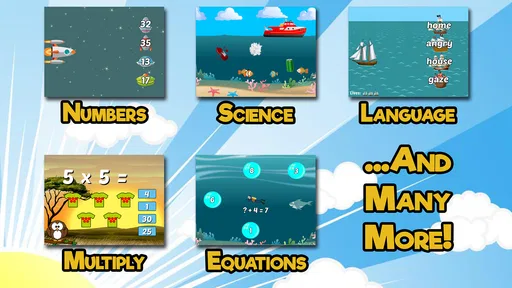
What caught my attention immediately is the variety of games available. From math to language arts, the app covers a broad spectrum of subjects. Each game is designed to reinforce different skills like addition, subtraction, reading comprehension, and spelling. I love how it balances learning with fun, making it easier for kids to absorb information without feeling pressured.
Interactive Learning Experience
The interactive aspect of the app is a game-changer. Kids aren't just staring at a screen; they're actively participating. For example, in the math section, children can solve problems by tapping and dragging objects, which makes abstract concepts more tangible. The reading games often involve listening to a story and answering questions, which helps improve comprehension skills.
Worth Reading Before You Choose

EA SPORTS FC Mobile 26 Is a Bigger Football Game, but It Takes Time

Flipboard Shows What News Apps Must Do Beyond the Feed

Switching to Android Auto Means Rethinking Your Driving Routine

Google Calendar Makes a Crowded Week Easier to Manage

Ludo King Makes the Most of the Minutes Between Plans

Baby Panda World Brings Quick Play to Modern Phones, but Its Game Library Feels Busy
One of my favorite features is the immediate feedback system. It’s like having a personal tutor guiding your child through each challenge. If a child answers a question incorrectly, the app provides hints and explanations, encouraging them to try again. This not only reinforces learning but also builds confidence.
That feedback is a reason I would sit nearby for the first few sessions, even if the child can operate the game alone. A quick look at how they respond to a mistake can tell you whether the explanation is helping or whether they are simply tapping through to continue. A useful routine is to ask the child to explain one answer in their own words after a round. That small pause turns a correct response into a chance to check understanding, without turning play into a test.
Easy Navigation and User-Friendly Design
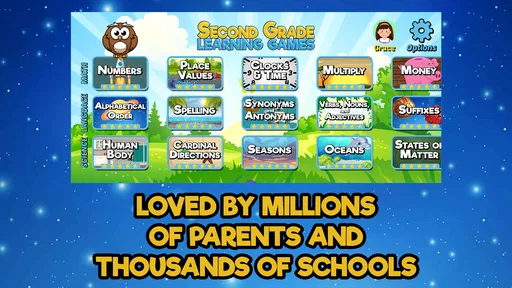
The app's layout is intuitive. Even for a second grader, navigating through the different games is a breeze. There’s a simple menu that categorizes the games by subject, and each game is clearly labeled, so kids know exactly what they’re diving into. The user-friendly design means less time figuring out how to play and more time actually playing and learning.
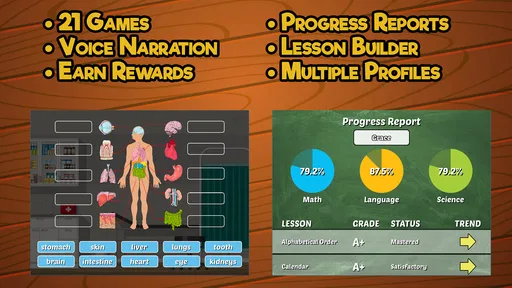
Parents will appreciate the dashboard feature, which gives insights into their child’s progress. It’s a fantastic tool for keeping track of what skills your child is excelling at and what areas might need a little more attention. This feature makes the app not only a learning tool but also a way for parents to be actively involved in their child’s education.
For a practical after-school session, I would let the child pick one activity, then choose a second one that revisits a skill they found tricky in class. Keeping the session bounded makes the app easier to fit around homework, dinner, or a trip in the car, and it avoids treating a larger menu as a reason to keep playing indefinitely. The progress view can help an adult decide what to revisit, but I would use it as a conversation starter rather than a complete picture of a child’s ability; a game result is only one small sample of learning.
Learning Beyond the Screen
While the app is primarily digital, it encourages learning that extends beyond the screen. Many of the activities inspire kids to think about real-world applications. For instance, a game about counting money can lead to practical lessons about saving and spending. The reading games often include stories that spark curiosity and imagination, prompting kids to explore topics further.
Moreover, the app includes printable worksheets that can be used offline. This is a thoughtful addition, allowing learning to continue even without screen time. It’s perfect for parents who want to balance digital and traditional learning methods.
I would use those worksheets as a bridge, not simply as extra pages to complete. After a digital activity, a child can try a related paper exercise and talk through the steps without tapping or dragging. This helps reveal whether the idea carries over when the screen cues are gone. It also gives families a way to alternate formats when a child has had enough device time. If printing is inconvenient, the games still have their own use; the paper option is an added route rather than a requirement for making the app worthwhile.
Where it fits among learning options
Compared with a standard workbook, this game has the advantage of offering interactive practice and immediate responses, which can make a reluctant learner more willing to begin. A workbook, on the other hand, can be easier for an adult to tailor to one exact skill and gives the child a screen-free task. Compared with broad video lessons, the game puts more emphasis on doing an activity than watching an explanation. I would choose it for variety and short practice, but choose a teacher, a focused tutoring tool, or a targeted workbook when a child needs a slower lesson on one specific concept.
A realistic use is a brief practice break while a parent prepares dinner: the child can work through one subject activity, then describe what they found easy or difficult. If the child is frustrated, I would stop and help identify the sticking point rather than switching rapidly between games. Variety is useful, but it can also become distraction if every challenging question leads to a new activity. The best use is intentional: pick a goal, play with attention, and finish with a quick conversation.
Cost, fit, and everyday trade-offs
The game is free to start, with optional in-app purchases listed from $4.99 to $39.99 per item. I would check purchase settings with a child before handing over a device, since a free download does not mean every available item is included at no cost. Its Everyone age rating makes it broadly suitable for family use, though parents should still decide whether the educational level and screen activity suit their own child.
It has an average rating of 4.1 from around 5,200 ratings, and more than one million installs. Those figures suggest it has found an audience, but they are not a substitute for checking whether its activities match a particular learner. It was released on February 14, 2013, and the current version is 9.2.0, with Android 8.0 or later required. I would pay attention to device compatibility before planning to use it on an older phone or tablet.
The strongest fit is a second grader who enjoys choosing among different kinds of practice, benefits from visual interaction, or needs a more inviting alternative to another worksheet. It may also suit a parent who wants to sit alongside a child and turn a short game into a chance to discuss schoolwork. I would skip it as the main option for a child who needs extensive one-to-one instruction, a carefully controlled sequence of lessons, or activities matched to a very specific classroom plan. In those cases, the breadth of a game collection is less valuable than targeted teaching.
Wrapping It Up
In conclusion, Second Grade Learning Games is an excellent educational resource that combines fun and learning in a seamless way. It’s designed not just to teach, but to inspire a love for learning. The mix of interactive games, user-friendly design, and educational depth makes it a standout choice for parents looking to supplement their child’s education.
So, if you’re looking for an app that will keep your child entertained while enhancing their knowledge and skills, give Second Grade Learning Games a try. You might just find it becomes a favorite in your household!
My recommendation is to begin with a specific need—perhaps a little reading practice or a chance to revisit a math skill—and see how your child responds to the activity and its feedback. Keep expectations modest: it is a supplementary game, not a full curriculum, and a parent’s brief involvement can make the practice more meaningful. For families who want approachable, varied second-grade activities in one place, that is a sensible role for it to play.
Pros
- Engaging graphics make learning fun.
- Wide variety of educational mini-games.
- Adaptive difficulty suits different skill levels.
- Offline mode available for on-the-go learning.
- Encourages independent problem-solving skills.
Cons
- Some in-app purchases required for full access.
- Limited parental control settings.
- Interactions can be repetitive over time.
- Ads may interrupt gameplay occasionally.
- Requires initial setup by an adult.
FAQs for Second Grade Learning Games
What age group is Second Grade Learning Games suitable for?
Second Grade Learning Games is specifically designed for children in the second grade, typically ages 7-8. The activities are tailored to fit the developmental and educational needs of this age group, making it a great tool for reinforcing classroom learning and enhancing cognitive skills.
Are there in-app purchases in Second Grade Learning Games?
Yes, Second Grade Learning Games includes optional in-app purchases. While the app offers a variety of free educational activities, additional content and features can be unlocked through these purchases. Parents should be aware of this if they prefer to limit spending within the app.
Is an internet connection required to use Second Grade Learning Games?
An internet connection is not required to play the basic games in Second Grade Learning Games, making it convenient for on-the-go learning. However, certain features, such as updates or additional downloadable content, may require a connection.
What subjects are covered in Second Grade Learning Games?
The app covers a range of subjects, including math, reading, science, and language arts. It provides interactive activities that align with the second-grade curriculum, helping children strengthen their understanding of core concepts through engaging gameplay.
How does Second Grade Learning Games ensure educational quality?
Second Grade Learning Games is developed by educational experts who ensure the content aligns with standard second-grade curricula. The app uses proven teaching methods and interactive elements to make learning enjoyable and effective, fostering both engagement and education.


